Depot Lambda Client
The Depot Lambda Client is a library made to facilitate access to the Depot Lambda Gateway when the client code is a TypeScript library.
Find the depot-lambda-client NPM package here
It supports:
- a fully-typed interface, that is able to work with hand-written types conforming to the schema known to Depot, or with types generated from the GraphQL representation of the Depot schemas
- optional retries with exponential backoff, when the client code embeds a complex workflow where it is more advantageous to have an occasionally sleeping lambda than to increase the complexity of a step function
- automatic conversions between in-memory types and the underlying JSON-safe representation. In particular,
Dateare translated to ISO 8601 strings that the underlying Depot engine understands.
How to use Depot Lambda Client
Requirements
- Your client code is written in TypeScript, and should have access to the environment's Depot Gateway Lambda's ARN and your dataset ID (this is normally done via CDK-provisioned environment variables).
- You have a description of your entity types in TypeScript. You can write them manually (aligned with the underlying Depot schema), or use the Depot GraphQL Tool to generate classes for you as part of your build process.
- you have a
IStageLoggerinstance from@stage-tech/stage-monitor-logging-client
Example
import { LambdaClient } from "@aws-sdk/client-lambda";
import { DepotLambdaClient } from '@stage-tech/depot-lambda-client'
import { IStageLogger } from "@stage-tech/stage-monitor-logging-client";
import { ConsoleLogger } from "typedoc/dist/lib/utils";

interface MyPet {
    /* ... fields from Depot schema definition file via GraphQL or manually ... */
}

const lambdaClient = new LambdaClient({});
const logger = LoggerFactory.getConsoleLogger();

const petDepotLambdaClient = new DepotLambdaClient<MyPet>(
    lambdaClient,
    logger,
    {
        depotLambdaArn: 'arn:aws:.....:depot-XXXXXXXXX-depot-lambda-gateway', // get it from CDK, likely via an env var
        datasetId: 'my-dataset-alias',
        schema: "my.Pet", // should match <MyPet>
        retryOptions: { // retryOptions is opt-in, if absent no retries in case of transient outages
            maxRetries: 5,
            initialDelayInSeconds: 1.2,
            backoffFactor: 1.5
        },
        recordCodec: StandardRecordCodecs.DepotFields
    });

async function example() {
    const myPet = await petDepotLambdaClient.create({
        /* TypeScript will require all mandatory properties, reject unknown properties if you put a constant here */
    });
    // myPet is of type MyPet & DepotFields
    // so id, version, created, updated & hash are defined

    await petDepotLambdaClient.patch(myPet.id, { /* someField: someNewValue */});
}
The DepotLambdaClient<T> is only for instances of type T. If you need to also access another type U, then you should
create a new instance DepotLambdaClient<U>. The DepotLambdaClient<?> object is thin, stateless and connectionless:
there is no cost in having multiple instances around.
About the recordCodec property
The DepotLambdaClient<T> relies on TypeScript type-level computations to ensure that the type T & DepotFields is
representable in JSON or that there exists a codec for each field which could otherwise not be safely represented in JSON.
By default, DepotFields includes two fields created and updated which are of type Date, which doesn't serde correctly
into JSON.
The StandardRecordCodecs.DepotFields provides the codecs for these two fields. It can easily be extended when needed:
import { DepotLambdaClient } from "./depot-lambda-client";

interface Quadruped {
    id?: string;
    birthDate: Date;
    legs: FourLegs;
}

interface FourLegs {
    leftFore: Leg;
    rightFore: Leg;
    leftHind: Leg;
    rightHind: Leg;
}

interface Leg {
    clawsClippedOn?: Date;
}

const depotClient = new DepotLambdaClient<Mammal>(lambdaClient, logger, {
    depotArn, dataset,
    schema: 'Mammal',
    recordCodec: StandardRecordCodecs.DepotFields, // WILL FAIL -- TypeScript will complain of missing fields
});
The recordCodec word will be underlined red, with the following annotation:
!["Type of parameters are incompatible... [complains about id, version]"](/stage-depot/assets/images/depot-lambda-client-fail-1-6c4914eb2292f695fd18ebda21cf3e23.png)
update the recordCodec line so that it reads:
recordCodec: StandardRecordCodecs.DepotFields.with({})
At this point, the {} will be underlined red, with the following annotation:

Simply start to fill the missing fields. birthDate is "some form of" Date, we can just provide the standard Date codec here,
which is FieldCodecs.Date.
The error message will now change to:
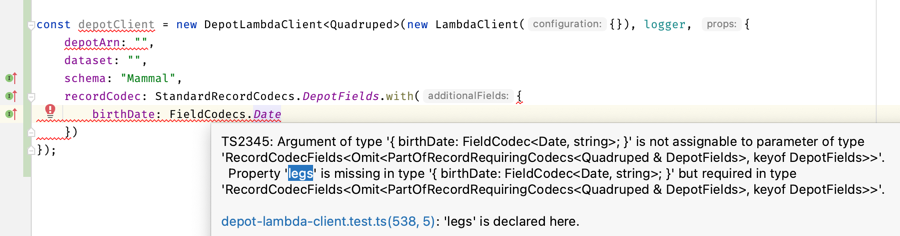
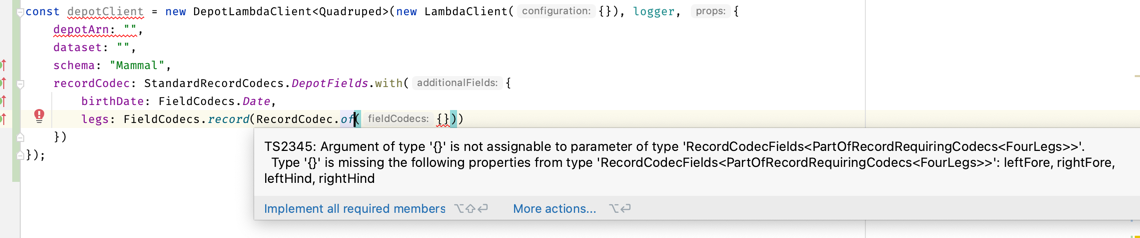
legs is a struct (an interface); if there is a complaint, it means that at least one of the fields
requires a codec. Let's find out; by providing a legs: FieldCodecs.record(RecordCodec.of({})):
Let's try to build a codec for the first leg, using the same process:
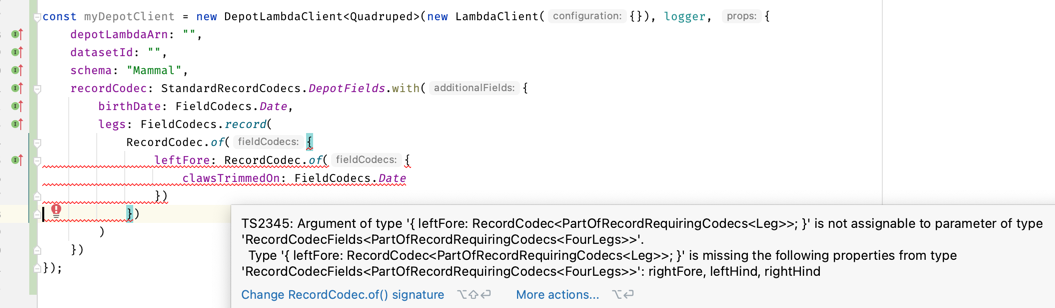
All four *leg fields require a codec, this is why legs required one. Since this is the same type,
we can create one and reuse it:
const LegCodec = RecordCodec.of<PartOfRecordRequiringCodecs<Leg>>({
    clawsTrimmedOn: FieldCodecs.Date,
});

const myDepotClient = new DepotLambdaClient<Quadruped>(new LambdaClient({}), logger, {
    depotLambdaArn: "",
    datasetId: "",
    schema: "Mammal",
    recordCodec: StandardRecordCodecs.DepotFields.with({
        birthDate: FieldCodecs.Date,
        legs: FieldCodecs.record(RecordCodec.of({
            leftFore: LegCodec,
            leftHind: LegCodec,
            rightFore: LegCodec,
            rightHind: LegCodec,
        }))
    })
});
Voilà! At this point the DepotLambdaClient<Quadruped> is able to safely communicate with the Depot Gateway Lambda, and
you can communicate with it using high-level types rather than JSON of strings.
the PartOfRecordRequiringCodecs<Leg> bit is a little not obvious, but it instructs
the compiler to extract just the fields that really need a codec to be representable in JSON.
It isn't necessary in the inline expression as the compiler is then able to infer it (there is "inference pressure"
to infer PartOfRecordRequiringCodecs<Quadruped> in the DepotLambdaClient constructor, which propagates into the
graph structure
the PartOfRecordRequiringCodecs<T> mapped type is built
in a way that strips the optionality, undefinability, nullability, and arrayness of the fields.
In a nutshell:
let x: PartOfRecordRequiringCodecs<{
    aString: string;
    date: Date;
    optDate?: Date;
    optDateOrUndefOrNull: Date | undefined | null; // e.g. Maybe<Date>
    arrayOfMaybeDates: (Date | undefined | null)[] | undefined | null;
}>;

/* x is of type: {
  date: Date;
  optDate: Date;
  optDateOrUndefNull: Date;
  arrayOfMaybeDates: Date;
} */
Testing
Combining jest, aws-sdk-client-mock and
depot-local, you can stand up a realistic test that lets you
validate that your code using depot-lambda-client:
import { InvokeCommand, LambdaClient } from "@aws-sdk/client-lambda";
import {
    DepotApi,
    DepotLocal,
    EnvironmentBuilder,
    loadIntoDepotViaBatch,
    LocationBuilder,
    proxyToDepotApiMap
} from "@stage-tech/depot-local";
import { MergedSchemas } from "@stage-tech/depot-schema";
import { LoggerFactory } from "@stage-tech/stage-monitor-logging-client";
import { mockClient } from "aws-sdk-client-mock";
import {
    DepotFields,
    DepotLambdaClient,
    DepotLambdaListOnlyClient,
    PartOfRecordRequiringCodecs,
    RecordCodec,
    StandardRecordCodecs
} from "@stage-tech/depot-lambda-client";

jest.setTimeout(360_000);

const DepotLambdaMock = mockClient(LambdaClient);

describe("sample test using DepotLambdaClient + Mock + DepotLocal", () => {

    it("should do simple creation when everything's good", async () =>
        await withContext(async (context) => {
            const myPet = await context.myPetDepotClient.create({
                /* TypeScript will require all mandatory properties, reject unknown properties if you put a constant here */
            });
            expect(myPet.version).toBeGreaterThanOrEqual(1);
        }));


    it("should retrieve objects even with simulated disruption", async () =>
        await withContext(async (context) => {
            await context.myPetDepotClient.create({
                id: "pet007",
            });

            DepotLambdaMock.reset()
                .on(InvokeCommand)
                .resolvesOnce(dynamoDbErrorResponse)
                .resolvesOnce(dynamoDbErrorResponse)
                .resolvesOnce(dynamoDbErrorResponse)
                .callsFake(proxyToDepotApiMap({[DATASET_ALIAS]: myPetDepotApi}));

            // this will show that the Depot Lambda Client will hit three failures before
            // finally resuming successfully

            const myPet = await context.myPetDepotClient.get("pet007");
            expect(myPet.version).toBeGreaterThanOrEqual(1);
        }));
});

const depotLocal = new DepotLocal({
    depot: {},
    dynamodb: {}
});

beforeAll(async () => {
    await depotLocal.start();
})

afterAll(async () => {
    await depotLocal.stop();
})

const MyTestNamespace: MergedSchemas = {
    // build it the way you want, reading a Depot Package or manually like this:
    [MyPetSchemaName]: MyPetSchema
};

function withContext<T>(action: (context: TestContext) => Promise<T>): Promise<T> {
    const myPetDepotApi = depotLocal
        .deploy(new EnvironmentBuilder(MyTestNamespace).location(LocationBuilder.dynamoDbWithTestScan()).build())
        .api(0);

    DepotLambdaMock.reset()
        .on(InvokeCommand)
        .callsFake(proxyToDepotApiMap({[DATASET_ALIAS]: myPetDepotApi}));

    const myPetDepotClient = new DepotLambdaClient<MyPet>(new LambdaClient({}), LoggerFactory.getConsoleLogger(), {
        depotLambdaArn: "unit-test",
        datasetId: myPetDepotApi.datasetId,
        schema: MyPetSchemaName,
        retryOptions: {
            maxRetries: 5,
            initialDelayInSeconds: 0.25, // shorter than in deployed code
            backoffFactor: 1.01 // really small backoff factor
        },
        recordCodec: StandardRecordCodecs.DepotFields
    });

    return action({myPetDepotApi, myPetDepotClient});
}

const dynamoDbErrorResponse = {
    StatusCode: 200,
    Payload: textEncoder.encode(
        `{
      "status": {
        "code": 500,
        "message": "Internal Server Error"
      },
      "data": {
        "code": "UnknownError",
        "message": "Internal server error (Service: DynamoDb, Status Code: 500, Request ID: HHB5VAOJ87RCUBAMGCMFFL2LJNVV4KQNSO5AEMVJF66Q9ASUAAJG)"
      }
    }`
    )
};
When to use depot-lambda-client, when to prefer alternatives
| Prefer using depot-lambda-client when... | Prefer direct depot gateway lambda calls when... | Prefer GraphQL when... |
|---|---|---|
| **access is controlled via IAM **, originates from within our AWS accounts | **access is controlled via IAM **, originates from within our AWS accounts | anonymous or personal access, from anywhere on the Internet |
| shallow navigation on most or all fields of a schema | shallow navigation on most or all fields | deep, narrow navigation within the object graph |
| many related operations in a short-lived process that is best represented as TypeScript source code | single trivially simple operations where making a step function Task is no more complicated than setting up a lambda | |
| Batch operations on dozens of individually-identified items at a time | potentially complex, multi-object mutations | |
| list operations aligned with an index on Dynamo-only Locations |