Testing UI
When the DepotTest backend starts (when the first test is executed), the backend is started with a set of parameters set according to the prevailing environment variables described here.
By default, the backend will remain loaded in memory and available for further use by the next test iterations for 15 minutes.
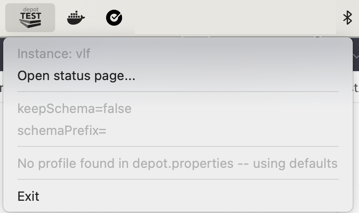
If possible, the backend will manifest its presence with an icon in the Menu Bar (MacOS) or in the System Tray (Windows):

Clicking on that icon provides a menu with the following options:
-
First section:
-
"Instance: vlf": provides you with the name of the rendez-vous file in the temporary directory, used for the front-end instances to locate the backend. This is normally named after the currently running version of the backend.
-
"Open status page...": opens a (currently crude, but help welcome) status page in your default browser, showing the current internal state of the backend (what tasks are running, or parked, what schemas are loaded, etc.)
-
-
Second section:
- shows the currently effective profile variables, which apply unless overridden by the environment variables.
-
Third section:
- currently shows nothing as no profiles have been defined in your
depot.propertiesfile.
- currently shows nothing as no profiles have been defined in your
-
Fourth section:
- there is an Exit button if you need to force a stop of the backend.
Switching between profiles
When profiles have been defined in the depot.properties file, you can now switch between them using a single click:
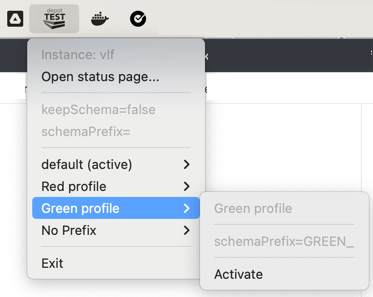
Clicking on the Activate menu entry will enter the "Green Profile" mode:
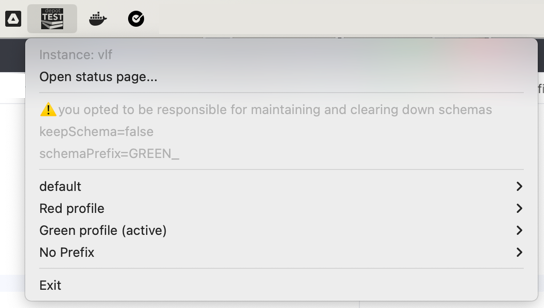
Any test started at this point, against the same instance of Depot Test will behave as if the SNOWFLAKE_SCHEMA_PREFIX
variable was set to GREEN_, until any of these events happens:
- the backend is stopped
- another backend (of a different version) is started
- the profile is switched again back to the defaults
- the user runs another test, explicitly setting
SNOWFLAKE_SCHEMA_PREFIXto something else.
The icon of the Depot Test backend is changed (negative picture) to indicate that a non-default profile is active.