Authentication
Depot allows to plug in authentication this is done using the auth property when defining a Depot Dataset with the CDK
library. There are two configuration options for Dataset authentication: Cognito, and IAM.
CDK Configuration
Cognito authentication is enabled by setting the auth.cognito property on a Dataset.
For example:
const cognitoLocation = new Location.Cognito(this, "Cognito", {
    environment: depotEnvironment,
    userPoolId: "userpool123",
    clientId: "client123",
    roleArn: "arn::123"
});

new Dataset(this, 'SampleSourceDataset', {
    environment: depotEnvironment,
    name: 'sample.source',
    location: sfkLocation,
    auth: {
        cognito: cognitoLocation.cognitoAuth
    },
    package: sourceSamplePackage
});
IAM authentication is enabled by setting the auth.iam property on a Dataset. You specify a list of IAM principals that
are authorized to access the resource.
new Dataset(this, 'SampleSourceDataset', {
    environment: depotEnvironment,
    name: 'sample.source',
    location: sfkLocation,
    auth: {
        iam: {
            principals: ["iam:principal:arn"]
        }
    },
    package: sourceSamplePackage
});
See more about CDK Authentication configuration here.
Accessing APIs
To access Depot APIs where authentication is enabled, you'll need to supply request headers.
GraphQL
Authenticating against the GraphQL API
The GraphQL API supports the following authn methods (subject to the configured environment):
- Cognito Bearer Token
- Cognito Basic Auth
- IAM Role
- Delegated auth (IAM Role + Bearer Token)
Basic Auth
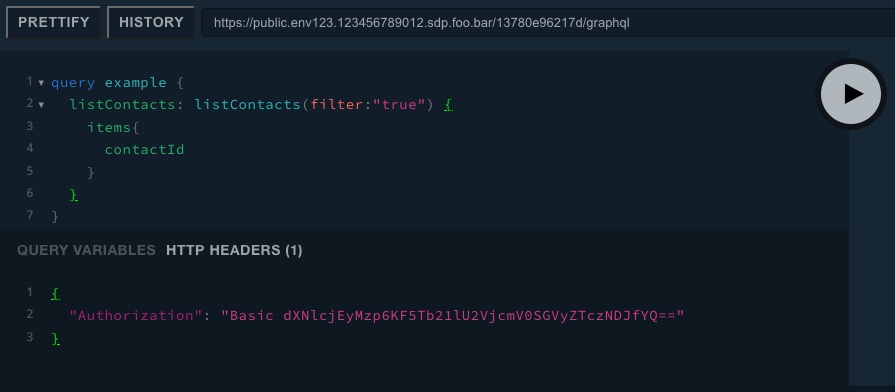
As an example, you may have configured Cognito authentication for a particular Dataset. To be able to execute queries, you'll need to use HTTP header Authorization in your GraphQL client.
A sample scenario might have a cognito user and password of:
user123z(^SomeSecretHere7342_a
You'll need a base64 encoded value for the Basic Authorization header.
echo -n 'user123:z(^SomeSecretHere7342_a' | base64
Which gives you:
dXNlcjEyMzp6KF5Tb21lU2VjcmV0SGVyZTczNDJfYQ==
Now set your Basic Authorization header for your GraphQL client:
{
    "Authorization": "Basic dXNlcjEyMzp6KF5Tb21lU2VjcmV0SGVyZTczNDJfYQ=="
}
Bearer Token
Bearer auth with Cognito requires the Authorization header to be set as follows:
{
    "Authorization": "Bearer TOKEN_HERE"
}
To manually generate a token via your Cognito client application, use the aws cognito-idp initiate-auth command. For
example:
aws cognito-idp initiate-auth --auth-flow USER_PASSWORD_AUTH --output json --region eu-west-1 --client-id {CLIENT_ID_HERE} --auth-parameters USERNAME={COGNITO_USERNAME},PASSWORD={COGNITO_PASSWORD} --profile {AWS_NAMED_PROFILE} | jq -r '.AuthenticationResult.IdToken'
The resulting IdToken can be used for the Bearer token value for requests to the REST or GraphQL endpoints against
Datasets that require auth.
Delegated Auth
If your service that integrated with Depot API needs to act on behalf of a user that invoked it, you can utilise delegated authentication flow. In this scenario you can pass an X-Subject-Token header with an AWS SigV4 signed request. The header should include a valid bearer token without the Bearer schema prefix.
{
    "X-Subject-Token": "TOKEN_HERE"
}
The API will validate both IAM principal and bearer token and will execute permission expressions against the subject user's claims.
When a service forwards an almost expired user's bearer token to Depot API latency between the calls might cause the token to expire before it gets validated on Depot's end. While this is an edge case, services that implement such calls should be aware of it and propagate the HTTP 401 error back to the initial caller (e.g. a frontend app) properly instead of returning an HTTP 500 response.
REST
As with GraphQL endpoints, REST can be used to access the Depot API too, via the public API endpoint. Authorization can be set with the Basic or Bearer methods.