GraphQL (GQL)
GraphQL is an open-source data query / manipulation language. GraphQL allows you to write queries and return exactly the data you need for a particular purpose, without relying on a specific end-point. Please read this guide for an introduction.
You can using browser plugins like Apollo and Altair to interact with GraphQL APIs.
Refer to Authentication for details on Authenticating GraphQL requests.
This page highlights some of the patterns that Depot implements in the GraphQL schema it generates from the YML schema.
See the Authentication page for more detail on authentication and authorization for Depot.
Depot Reserved Fields
All GraphQL types generated for Depot entities will have the following reserved fields:
| name | type | notes |
|---|---|---|
| id | string | The identity field for an object. Autopopulated with a uuid based id if not provided on object creation. |
| schema | string | The object's type name in the schema |
| version | integer | The version of this object instance. This is iterated on each update. The latest version is always served by default if a specific version is not requested. |
| hash | string | Generated hash. Ignores id, created, updated and version, and sorts all fields then does md5 but changing to murmer3 shortly. It's for fast lookup by values |
| created | date/time | Populated on objection creation. Format: YYYY-MM-DDTHH:mm:ss.sss |
| updated | date/time | Populated each time the object is versioned. Format: YYYY-MM-DDTHH:mm:ss.sss |
These fields will be accessible on the root entity type for all query results. These fields cannot be explicitly updated
via mutations although id may be set on entity creation.
The version field may be used to select a specific version of an entity in queries, but will otherwise default to the
latest version. It can be used to force concurrency checks during updates.
Queries
Depot generates two query endpoints for each entity defined in the schema:
get...queries return an individual entity byidlist...queries support searching and paging over entities using the Basestar expressions syntax.
Note: all fields are optional in query results.
GET queries
Get queries follow this pattern:
query{
  getPet(id: "123", version:1) {
    # Depot reserved fields...
    id
    created
    updated
    schema
    version
    hash
    # Entity schema specific fields...
    name
    species
    etc
  }
}
Note: the version field is an optional input and supports selecting a specific version of the entity (versions are incremented on every updated). The latest version will be returned by default.
GET queries on views via primary key
If a view schema specifies a primaryKey (see Views),
then a get... query will be generated to support querying a single object by the primary key fields:
query {
  getPetNameCount(name: "pet1") {
    name
    count
  }
}
Complex (nested) primary keys are supported - GraphQL schema will have inputs corresponding to only the fields that make up the primary key:
query {
  getPetstorePetStoreNameCount(
    name: "pet1"
    store: { id: "00ec4277-efc4-41af-86fb-f2c6d69f269c" }
    location: { region: { name: "testRegion" } }
  ) {
    name
    count
    store { id, name }
    location { label, region { name, capital } }
  }
}
Omitting an optional primary key field in the input will result in a default null value for that field when querying
(not omission of the field - i.e. partial primary key GETs are not supported).
If a provided primary key is not unique for the underlying view data (i.e. >1 rows could be returned for the key),
then an error with code KeyNotUnique and HTTP status 500 will be returned for the query.
Care must be taken when specifying primary key fields to avoid clashing with reserved GraphQL input fields such as
consistency.
LIST queries
List queries follow this pattern:
query{
  listPets(filter:"name == 'fluffy'", sort: "species:asc", limit: 25, nextToken: null) {
    nextToken
    items{
      # Depot reserved fields...
      id
      created
      updated
      schema
      version
      hash
      # Entity schema specific fields...
      name
      species
      etc
    }
  }
}
List query input parameters:
| name | type | notes |
|---|---|---|
| filter | string | Basestar expression on the entity fields. Method and function calls are pushed down to SQL when they have a SQL translation |
| sort | string or string array | sort expression: fieldName:asc|desc or fieldName:asc|desc:nulls-first|nulls-last |
| limit | integer | page result size |
| nextToken | string | paging token |
Note: Depot handles sort order for ascending values: numbers first, then uppercase letters (A-Z), then lower case letters (a-z), and then lastly nulls. Reversed of course for descending order.
The sort order is specified as a field name followed by an optional :asc or :desc to indicate the sort direction,
followed by an optional :nulls-first or :nulls-last to indicate how null values should be sorted relative to non-null values.
If no direction is specified, it defaults to ascending order.
If no nulls order is specified, it defaults to nulls-last if the sort direction is ascending, and nulls-first if the sort direction is descending.
List query result fields:
| name | type | notes |
|---|---|---|
| nextToken | string | token to use to fetch the next page of results |
| items | object array | contains the entity results |
Note: list ordering is not guaranteed when Snowflake is the backing storage engine for the Dataset's Location.
Filtering referenced entities on queries
Depot supports the following pattern for filtering over referenced entities expanded in get... and list... query
results:
query{
  getPet(id: "123", version:1) {
    name
    species
    sex
    descendants(filter: "sex == 'female'") {
      id
      name
    }
  }
}
filter is
a Basestar expression on the
referenced entities fields.
⚠️ There are limitations applied to the number of entities returned via nested references.
Mutations
Depot generates the following mutation endpoints for each entity defined in the schema:
create...creates a new instance of an entity, either under theidprovided or under a randomly generateduuidupdate...updates an existing instance of an entity byiddelete...deletes an existing instance of an entity byid
All mutation types accept an optional consistency input field. When omitted, the effective
default and the strongest accepted value depend on the dataset's location type:
| Location type | Default | Strongest accepted | Transactional SQL writes |
|---|---|---|---|
| Snowflake (native) | ATOMIC | any | Yes — BEGIN / COMMIT |
| Aurora (PostgreSQL) | ATOMIC | any | Yes — BEGIN / COMMIT |
| S3Tables (Snowflake Iceberg) | ATOMIC | ATOMIC (ATOMIC_ALL rejected) | No — Iceberg provides single-table atomicity |
| DynamoDB | QUORUM | any | — |
Accepted consistency values (strongest to weakest): ATOMIC, QUORUM, EVENTUAL, ASYNC.
CREATE mutations
Create mutations follow this pattern:
mutation {
  createPet(id: "0987",
    data: {
      name: "Bill",
      species: PONY
    },
    expressions: {

    })
  {
    id
    created
    updated
    schema
    version
    hash
  }
}
Create mutation input parameters:
| name | type | notes |
|---|---|---|
| id | string | the id to create this entity instance under - it must be unique and will default to a uuid if not supplied |
| data | object | object containing input fields based on the specific entity schema - fields will be mandatory if flagged as required in the YM schema |
| expressions | object | object contain string expression fields tied to the fields defined on the specific entity schema |
| consistency | string | optional — see consistency defaults by location type |
UPDATE mutations
Update mutations follow this pattern:
mutation {
  updatePet(id: "0987",
    version: 1,
    data: {
      name: "Bill",
      species: PONY
    },
    expressions: {

    })
  {
    id
    created
    updated
    schema
    version
    hash
  }
}
Update mutation input parameters:
| name | type | notes |
|---|---|---|
| id | string | the id of the entity instance to update |
| version | integer | optional field for triggering concurrency check on update - will generate a concurrency exception if the version is different |
| data | object | object containing input fields based on the specific entity schema - fields will be mandatory if flagged as required and will not be available to update if flagged as immutable in the YML schema |
| expressions | object | object contain string expression fields tied to the fields defined on the specific entity schema |
| consistency | string | optional — see consistency defaults by location type |
⚠️ Update mutations re-write the entire object so you must populate all entity fields you wish to preserve after the update, not just the fields you are changing
Note: Depot will support patch... mutations in the future to support partial updates.
DELETE mutations
Delete mutations follow this pattern:
mutation {
  deletePet(id: "0987", version: 1)
  {
    id
    created
    updated
    schema
    version
    hash
  }
}
Delete mutation input parameters:
| name | type | notes |
|---|---|---|
| id | string | the id of the entity instance to delete |
| version | integer | optional field for triggering concurrency check on delete - will generate a concurrency exception if the version is different |
| consistency | string | optional — see consistency defaults by location type |
Creating and Updating object references in mutations
Depot supports the refEntity: { id: "xyz" } pattern for creating or updating object references on entities.
In the following example owner: { id: "SAM73" } create a reference to another entity:
mutation {
  createPet(id: "0987",
    data: {
      name: "Bill",
      species: PONY,
      owner: {
        id: "SAM73"
      }
    })
  {
    id
    created
    updated
    schema
    version
    hash
  }
}
Note that this is not a complete copy of the referenced entity, just a shallow expression to enumerate the object reference field and nested entity id.
GraphQL setup
You can access the generated GraphQL schema using the graphql-cli app.
install with npm or yarn:
- npm
- Yarn
- pnpm
- Bun
npm install -g graphql-cli
yarn global add graphql-cli
pnpm add -g graphql-cli
bun add --global graphql-cli
Setup your .graphqlconfig file (configure endpoints + schema path):
graphql init
Download the schema from the server:
graphql get-schema
Creating an API Gateway
To use the GraphQL APIs, you’ll need a gateway that allows you to access the APIs over the internet. Simply add the
following to your project CDK repository, within the environment class constructor() method:
new depot.Gateway.API(this, "StandardGatewayApi", {
  environment: myDepotEnvironment
});
Where myDepotEnvironment is the Depot environment object.
Data API
The Data API allows you to interact with your data using GraphQL. It can be accessed via the following URL conventions:
- Environment level GraphQL endpoint: https://public.{env-id}.{aws-account-id}.domain.tld/graphql
- Dataset level GraphQL endpoint: https://public.{env-id}.{aws-account-id}.domain.tld/{dataset-id}/graphql
Your GraphQL client should show you a list of available queries and mutations if introspection is enabled. (Introspection can be enabled at the Depot aws-cdk Environment resource level).
GraphQL clients
A recommended GraphQL client for exploring and querying Depot APIs is the Insomnia client. This client makes it easy to define graphql queries and integrate seamlessly with your AWS credentials if the dataset you are working with has IAM authentication configured. See: Authentication
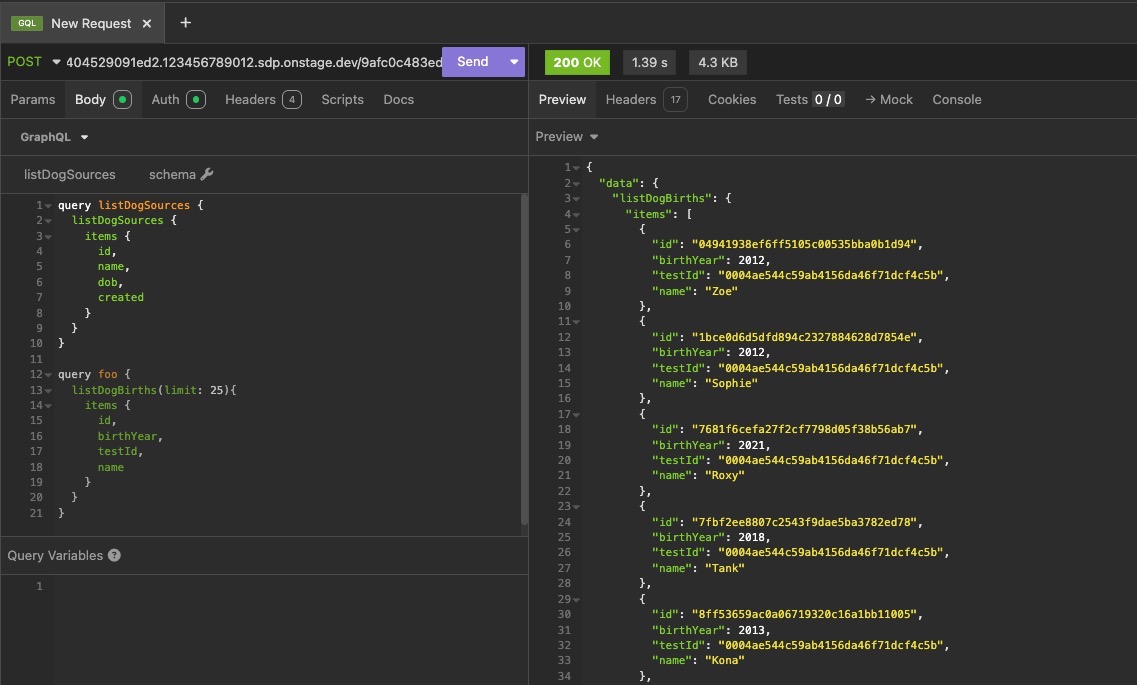
To setup Insomnia and use IAM Auth, provide the Dataset level GraphQL endpoint, e.g. https://iam.e2e404529091ed2.123456789012.sdp.onstage.dev/9afc0c483ed3/graphql, and set request type to POST.
Next, use the Auth tab to choose AWS IAM, then provide your current temporary AWS IAM session credentials for your role. For example, via your identity-provider login, access your AWS SSO page, find the relevant AWS account the environment you're querying is running in, and then reveal the Access Keys for the applicable role you use. Fill in the Auth details along with the service type of execute-api.
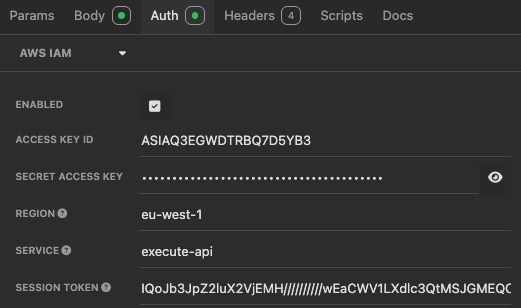
Querying the dataset with IAM authentication is now a simple task of editing your request body to change or define your queries or mutations.
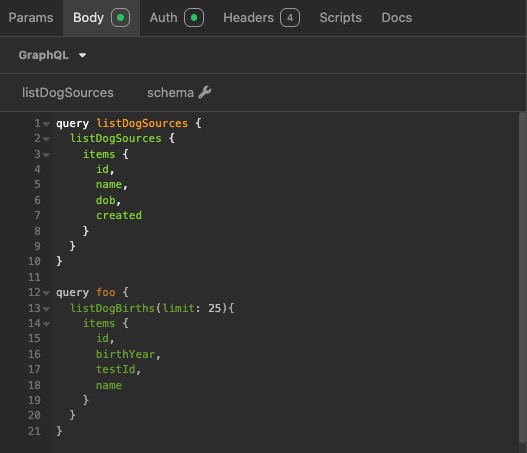
Viewing the request results:
Basic query examples
Simple list query returning 5 items with specifically selected fields:
query example {
  listContacts: listContacts(filter:"true", limit: 5) {
    items{
      contactId,
      contactFirstName
    }
  }
}
Get query to get an item by id:
query getFileById {
  getSampleFiles(id:"e8dc6015-ecfb-4890-b5d4-674d5995003a") {
    id,
    fileName,
    version
  }
}
Create a new item with a mutation, and return the id of created item:
mutation a{
  createAction(data:{
    s3Uri:"s3://foo-bar/change/data",
    operation:INSERT
  }) {
    id
  }
}
Delete queries
The implementation of GraphQL server that Depot uses requires you to select at least one field for delete queries. E.g:
mutation {
  deleteContact(
    id: "contact123"
  ) {
      id
  }
}
If you prefer, you could select the gql metafield: __typename (useful if you don't know what fields are in an object
and just want to satisfy the query parser), for example:
mutation {
  deleteContact(
    id: "contact123"
  ) {
      __typename
  }
}
Batch queries
Depot supports batch queries, which allow you to run multiple queries in a single request that is run in a single transaction.
mutation createPersonWithContacts($personId: ID!, $id2: ID!, $personName: String, $phone: Any) {
  batch {
    createPerson(id:$personId, data:{name:$$personName}) {
      id
      x
    },
    createPersonContact(id:$id2, data:{number:$phone}, person:{id:$personId}) {
      id
      any
    }
  }
}