REST
The REST API endpoint is available inside the Depot environment VPC network. It is also exposed via the public API gateway endpoint for your environment.
A Network Load Balancer (NLB) is created with every Depot environment of type internal. This NLB's hostname is
resolvable over the internet, however will always point to an internally accessible VPC endpoint IP address. Requests
can be sent unencrypted when issued internally on port 80.
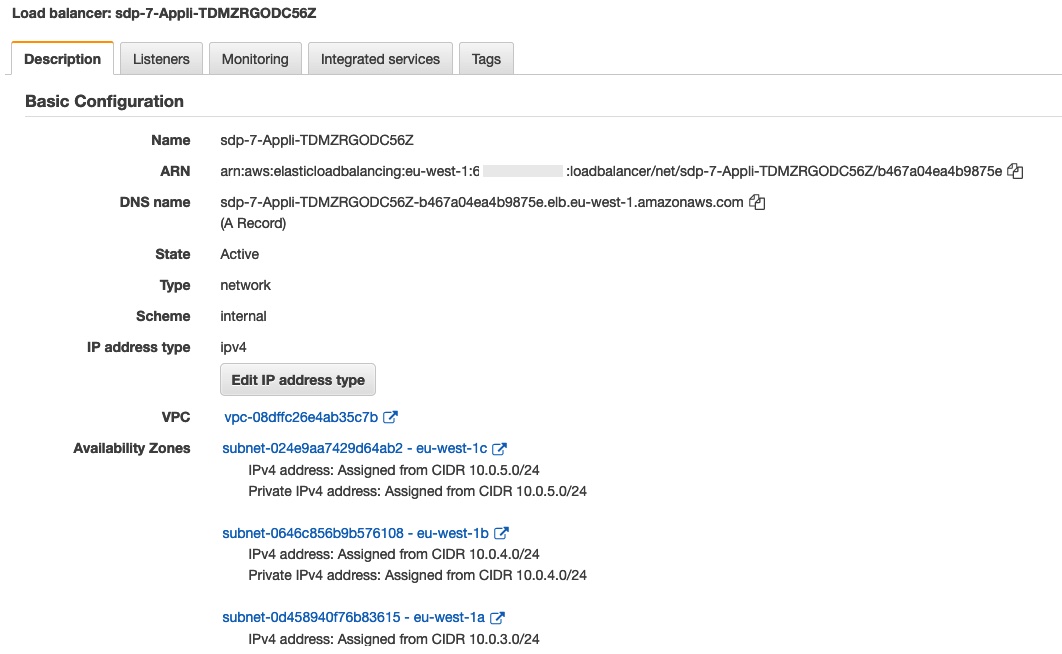
The NLB sits in front of the Depot Connector API.
You will only be able to access resources from this NLB from inside the VPC network. The Lambda Gateway function is preconfigured to send API requests to this internal endpoint when the function is invoked.
If you need custom integration, it is possible to use this endpoint, however you will need to supply the correct request headers.
Conventional rest endpoints
GET
GET https://{authkind}.{envid}.{accountid}.sdp.onstage.dev/{dataset}/{schema}/{id}
with authkind = iam (caller must operate within a role
allowed to talk to the REST gateway,
or public (Cognito-based)
With the following headers set:
X-Environment-Uri: points at the current environment state fileAuthorization:Proxy {iamArn}(iam) orBearer {token}(public)X-Base-Domain:{dataset}X-Domain:{dataset}
With the following query parameters optionally set:
expand: comma-separated list of names to expand
... TODO ...
List (filter)
GET https://{authkind}.{envid}.{accountid}.sdp.onstage.dev/{dataset}/{schema}
with the same headers as above. The query parameter is a Basestar expression on the entity fields, the
counterpart of the filter argument of a GraphQL list query. Method and function calls in it
are pushed down to SQL when they have a SQL translation; the others are
applied in memory on a superset of rows fetched from the database.
Structured request endpoint (incl. batch requests)
All forms of request can be sent in a POST request to the dataset path of the REST API, suitably enveloped, for example:
POST https://public.{envid}.{accountid}.sdp.onstage.dev/{dataset}
or:
POST https://{dataset}.public.{envid}.{accountid}.sdp.onstage.dev
{
    "update": {
        "schema": "MySchema",
        "id": "id1",
        "data": {
            ...etc...
        },
        "mode": "merge",
        ...etc...
    }
}
The following action types (set as wrapper keys) are supported:
readSupporting the following arguments:schema(required) schema to read fromid(required) id to readversion(optional) version to readexpand(optional) set of names to expandprojection(optional)consistency(optional)linkConsistency(optional)
createschema(required) schema to write todata(required) property valuesid(optional) id to readexpand(optional) set of names to expand in the responseprojection(optional)consistency(optional)expressions(optional)
updateschema(required) schema to write todata(required) property valuesid(required) id to readexpand(optional) set of names to expand in the responseprojection(optional)consistency(optional)expressions(optional)
deleteschema(required) schema to write toid(required) id to deleteconsistency(optional)
batchactions(required) set of these actions, see below.
The consistency field
The optional consistency field on write actions (create, update, delete) controls the
atomicity guarantee requested from the storage backend. Accepted values (strongest to weakest):
| Value | Meaning |
|---|---|
ATOMIC | Full cross-record atomicity — storage wraps the write in a transaction |
QUORUM | Quorum-based consistency |
EVENTUAL | No cross-record atomicity guarantee |
ASYNC | Fire-and-forget |
When omitted, the effective default depends on the dataset's location type:
| Location type | Default | Strongest accepted | Transactional SQL writes |
|---|---|---|---|
| Snowflake (native) | ATOMIC | any | Yes — BEGIN / COMMIT |
| Aurora (PostgreSQL) | ATOMIC | any | Yes — BEGIN / COMMIT |
| S3Tables (Snowflake Iceberg) | ATOMIC | ATOMIC (ATOMIC_ALL rejected) | No — Iceberg provides single-table atomicity |
| DynamoDB | QUORUM | any | — |
These structured requests can also be wrapped into a single batch request as follows:
{
    "batch": {
        "actions": {
            "myAction1": {
                "update": {
                    "schema": "MySchema",
                    "id": "id1",
                    "data": {
                        ...etc...
                    },
                    "mode": "merge",
                    ...etc...
                }
            },
            "myAction2": {
                "update": {
                    "schema": "MySchema",
                    "id": "id2",
                    "data": {
                        ...etc...
                    },
                    "mode": "merge",
                    ...etc...
                }
            }
        }
    }
}
The response from a batch request is a map with the response from each action keyed by the supplied name in the request, e.g.:
{
    "myAction1": {
        "id": "id1"
    },
    "myAction2": {
        "id": "id2"
    }
}
Dataset echo rest endpoints
An echo endpoint is provided for all Datasets in an environment, accessible by sending a GET request to the /echo path on the Dataset endpoint.
For example:
curl -H "Authorization: Bearer BEARER_TOKEN_HERE" https://public.{environment_id}.{aws_account_id}.sdp.onstage.dev/{dataset_id}/echo

{
  "path" : "/",
  "headers" : {
    "empty" : false
  },
  "requestId" : "3186c0b1-c438-4dc1-bc04-014447469767",
  "caller" : {
    "anon" : false,
    "schema" : "User",
    "id" : "johnc",
    "claims" : {
      "sub" : "144fc6fc-c19d-4b95-ad2b-81d17ee12870",
      "email_verified" : true,
      "iss" : "https://cognito-idp.eu-west-1.amazonaws.com/eu-west-1_ZZZZZZZ",
      "cognito:username" : "johnc",
      "origin_jti" : "c2ba14f2-a8a4-42fa-a8f9-5159ad1003e4",
      "aud" : [ "122qf84mf91flkvltal6zzzzz" ],
      "event_id" : "d5a91697-719e-4030-b339-6f903b198021",
      "token_use" : "id",
      "auth_time" : 1664446348,
      "exp" : 1664449948000,
      "iat" : 1664446348000,
      "jti" : "zzz2de0f-ae25-41b3-a417-f373a203364c",
      "email" : "john@example.com"
    },
    "super" : false
  },
  "method" : "get",
  "query" : {
    "empty" : true
  },
  "contentType" : "json",
  "accept" : "json"
}
The above endpoint can also be used to inspect the caller and claims provided by the authentication provider, in
this case Cognito.
Raw SQL query endpoint
The raw SQL query endpoint allows you to execute arbitrary read-only SQL queries against the underlying database
(Aurora/PostgreSQL or Snowflake) for a dataset. The connection is opened in read-only mode, so any DML
(INSERT, UPDATE, DELETE) or DDL (DROP TABLE, etc.) statements will be rejected by the database.
Prerequisites
The endpoint is only available through the IAM gateway and must be explicitly enabled on the dataset configuration
with rawSqlEndpointEnabled: true under auth.iam section in dataset config (see auth).
If you're executing the Raw SQL query endpoint against a dataset in a Snowflake location
you must make sure that the user provided in the executor config has the DEPOT_READONLY role assigned to it.
Depot leverages this role to open a read only session and prevent DML/DDL operation from being run.
Endpoint URL
POST https://iam.{envid}.{accountid}.sdp.onstage.dev/{datasetId}/raw-query
Request body
The request body is a JSON object with the following properties:
| Property | Type | Required | Description |
|---|---|---|---|
sql | string | Yes | The SQL query string. May contain table/column replacement tokens (@{...}) and argument binding placeholders (${...}). Must not be blank. |
using | map<string, string> | No | Maps short alias names used in @{...} tokens to fully-qualified schema names (e.g. "pet": "petstore.Pet"). Every alias referenced in the SQL must have a corresponding entry. |
arguments | map<string, Argument> | No | Named query parameters referenced by ${...} placeholders. Each entry is an Argument object (see below). |
Argument object:
| Property | Type | Required | Description |
|---|---|---|---|
value | any | Yes | The value to bind. |
type | string | Yes | The scalar type name. |
Optional headers
The standard executor operation hint headers are supported on this endpoint, just as on any other REST API endpoint:
| Header | Description |
|---|---|
executor-name | Override the default executor (e.g. a specific Snowflake warehouse). |
tags | JSON-encoded tags to pass to the storage layer for observability, etc. |
SQL replacement tokens
The sql string supports two kinds of replacement tokens that are resolved before the query is executed:
@{alias}— replaced with the fully qualified table name for the schema mapped toaliasin theusingmap.@{alias.property}— replaced with the physical column name for the given property in the schema mapped toalias. Nested paths are supported (e.g.@{p.store.id}resolves to the physical column for thestoreforeign-keyid).${argName}— replaced with a parameterised bind variable whose value and type are taken from the matching entry in theargumentsmap. This is the recommended way to supply user-provided values safely.
For full details — naming strategies per backend, Iceberg quoting, history table aliases, cross-strategy views — see SQL tokens (@{} and ${}).
Example request
{
  "sql": "SELECT p.name AS \"name\", s.name AS \"storeName\" FROM @{pet} p JOIN @{store} s ON p.store_id = s.id WHERE s.name = ${storeFilter}",
  "using": {
    "pet": "petstore.Pet",
    "store": "petstore.Store"
  },
  "arguments": {
    "storeFilter": {
      "value": "MyStore",
      "type": "string"
    }
  }
}
Response
The response is a JSON array of objects. Each object represents a row, with keys matching the column aliases defined in
the SQL SELECT clause:
[
  {
    "name": "Fido",
    "storeName": "MyStore"
  },
  {
    "name": "Rex",
    "storeName": "MyStore"
  }
]
An empty result set returns [].
Depot returns values returned by the DB server as-is. Therefore, if you want to ensure specific casing of field names (e.g. have them in lowerCase or PascalCase)
ensure that column aliases are wrapped in double quotes. Otherwise, the DB engine will return them converted to the default naming convention
(e.g. UPPER_CASE for Snowflake and snake_case for Aurora/Postgres).
Validation errors
| HTTP Status | Condition |
|---|---|
400 | sql is missing or blank. |
400 | A @{...} token references an alias not declared in using. |
400 | A ${...} placeholder references an argument name not present in arguments. |
400 | An argument's type is not a recognised scalar type name (e.g. a typo or a non-string value such as 123). |
403 | The request was sent through a non-IAM gateway (e.g. public). |
403 | The raw SQL endpoint is not enabled for the target dataset. |