Environment
Overview and configuration
The Environment is the first Construct you will need to create a Depot environment.
const depotEnvironment = new Environment(this, `MyEnvironment`, {
  account: { name: 'example', id: Aws.ACCOUNT_ID },
  name: 'test',
});
You may not even need to create an Environment, but rather to locate a shared environment. For instance:
const depotEnviroment = Environment.fromEnvironmentProps(this, 'SharedEnvironment', {
  accountId: Aws.ACCOUNT_ID,
  environmentId: 'shared-12345678',
});
When creating a new environment, it is possible to perform certain one-type adjustments:
new Environment(this, 'ExampleEnvironment', {
  account: { name: 'dev', id: Aws.ACCOUNT_ID },
  name: 'example',
  idPrefix: 'exmpl-',
  useSharedVpc: true, // set to true if deploying to a dev account.
});
Creating an Environment with the Depot CDK library will set up all the base infrastructure for, including the Depot API and a dedicated VPC (virtual private cloud). An Environment gets a unique ID when created (referred to as your Depot Environment ID). It looks something like this:
sdp-e2dd35eedfec
When creating an environment, you also designate an environment name. All AWS resources created for an environment are tagged with the environment ID and environment name (in addition to other tags such component and service).
To help easily identify resources, you may wish to add your own custom prefix to the Depot autogenerated environment ID. Use the idPrefix property on the Environment construct to achieve this. The idPrefix is limited to:
- must be between 3 and 10 characters
- alphanumeric
- lowercase
- may include dashes
For example:
const depotEnvironment = new Environment(this, `MyEnvironment`, {
  account: { name: envName, id: Aws.ACCOUNT_ID },
  name: 'example',
  idPrefix: 'dev-net-1-',
});
The above configuration would yield an environment ID similar to:
dev-net-1-e2dd35eedfec
Your various infrastructure resources would generally then be prefixed with:
sdp-dev-net-1-e2dd35eedfec
An environment's configuration is always stored and kept up-to-date in a dedicated CodeCommit repository.
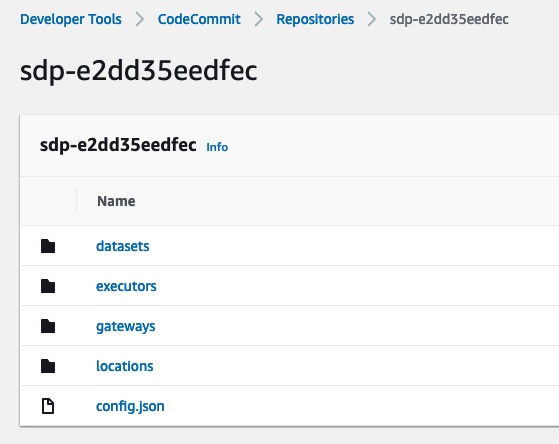
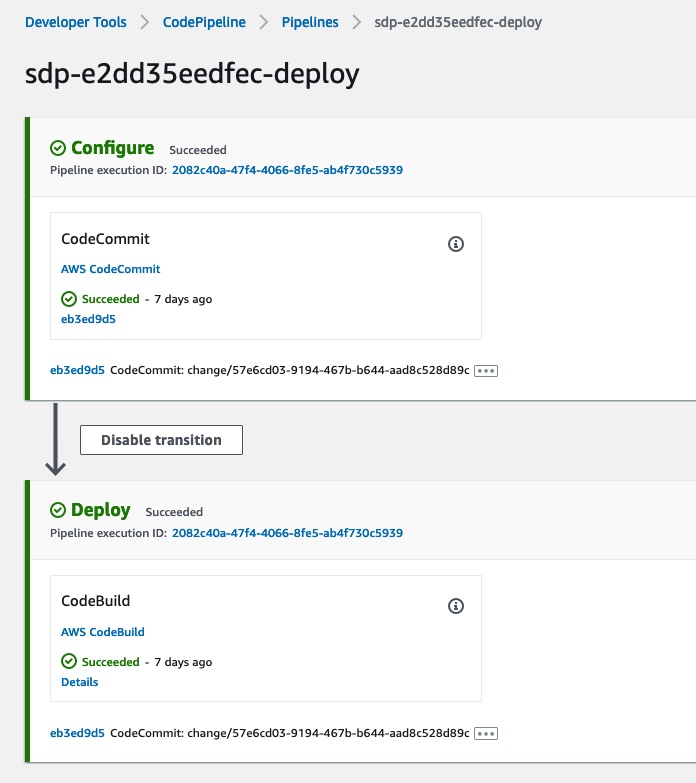
An environment will also be setup with a dedicated CodePipeline project. This is used in conjunction with the CodeCommit repository as a means of deploying your environment's latest configuration changes. (Changes in CodeCommit are managed automatically when you cdk deploy or cdk destroy your Depot Project using the @stage-tech/depot-cdk npm library).
When creating further Depot Constructs for your project, you will often pass in a reference to your Depot Environment Construct.
For example, creating a Dataset requires a reference to an Environment.
new Dataset(this, 'ExampleDataset', {
  environment: depotEnvironment,
  name: 'sample.source',
  location: myLocation,
  package: myPackage,
});
Environment API Configuration
Certain options to change the performance, scaling, and metrics available on the Depot API are able to be configured with the Environment construct.
Here is an example demonstrating custom autoscaling options, and enabling of Container Insights:
new Environment(stack, 'ExampleEnvironment', {
  name: 'example',
  frontend: {
    scaling: {
      maxCount: 5,
      cpuPercent: 75,
      memoryPercent: 90,
      scaleInCooldown: Duration.minutes(5),
    },
    containerInsights: true,
  },
});
Sharing a VPC
It's possible for a Depot environment to share a VPC with other AWS resources. This sharing model allows you to save on cost with the downside being multi-tenancy in a potentially flat VPC network.
// Use the default AWS Account's Depot-bootstrapped VPC if available
new Environment(stack, 'ExampleEnvironment', {
  name: 'example',
  useSharedVpc: true,
});
// Use a custom VPC by name (must exist in same AWS account, and should also provide both public and private subnets).
new Environment(stack, 'ExampleEnvironment', {
  name: 'example',
  useSharedVpc: 'some-custom-vpc-defined-elsewhere',
});
Environments are locked into the VPC choice they make when first created. It is not possible at the moment to switch the configuration of useSharedVpc once
an environment is deployed.
Deployment Modes
Depot Environment construct accepts a deploymentMode property. I can be one of the following values:
STRICT(default) - this mode trigger a "full" environment deployment and forces all downstream resources (locations, datasets, executors) to be updated.RELAXED- this mode does not redeploy datasets when only Depot's backend services are updated. It results in faster deployment times and is useful in App repo configurations where any dataset updates are triggered by App deployment if they have any changes in them.
Under the hood RELAXED mode tweaks how dataset configuration is serialized and omits Depot version and other environment fields that are not necessary for deployment.
This results in less changes detected by CloudFormation. However, this does mean that any Depot promoted changes in dataset configuration (e.g. a new prop)
will cause all datasets to be redeployed on this specific version bump. Similarly, your dataset might not pick up deployment related backend-only changes.
In such cases, you might need to switch back to STRICT mode to force update relevant datasets and then switch back to RELAXED mode.
Because of the reasons mentioned above our recommendation is enabling RELAXED deployment mode in development environments only to evaluate the risk and impact of the change.
If you see that your deployments are stable and you are not facing any dataset drift issues, only then consider a phased rollout of this mode to upper environments.
See Environment Config Pipeline page for a more detailed explanation how configuration values are propagate and used in the deployment pipeline.
Aurora PostgreSQL Version
Depot Environment construct accepts an auroraMajorVersion property, which sets the major PostgreSQL version for
every Aurora (PostgreSQL) Location deployed in that environment. It exists so that a major version rollout can be
scheduled per environment, independently of the Depot platform version.
AuroraMajorVersion.POSTGRES_16(default) - PostgreSQL 16.xAuroraMajorVersion.POSTGRES_17- PostgreSQL 17.xAuroraMajorVersion.POSTGRES_18- PostgreSQL 18.x
import { AuroraMajorVersion, Environment } from '@stage-tech/depot-cdk';

new Environment(this, 'Environment', {
  name: 'example',
  auroraMajorVersion: AuroraMajorVersion.POSTGRES_17,
});
You select the major version; Depot owns the minor version each major resolves to. That mapping travels with the Depot platform version, so a minor version bump (e.g. 17.9 to 17.11) reaches your environment through a normal Depot upgrade and does not require a change in your App repo.
The property is omitted from dataset configuration in RELAXED deployment mode, so bumping the Aurora version does not
by itself redeploy your datasets. In STRICT mode the usual full-environment deployment rules apply.
Changing auroraMajorVersion on an existing environment is a major version upgrade of a live database, not a
configuration tweak. CloudFormation changes the cluster's EngineVersion and replaces the cluster parameter group with
one of the matching family; the upgrade itself is performed by RDS and involves cluster downtime.
Before the first rollout in any environment, check the AWS Aurora PostgreSQL major version upgrade prerequisites against
your cluster - in particular the handling of logical replication slots, since Depot clusters run with
rds.logical_replication enabled and pglogical preloaded. Roll it out to a development environment first.
Further information
Take a look at the Depot CDK API documentation for further details.