Depot CDK
The @stage-tech/depot-cdk npm module lets you use our interfaces for Environment, Package, Dataset, Location, (and more) creation in your own CDK project code.
General structure
Depot arranges the deployment of schemas grouped into packages into locations which represent the storage engines (the association of a package and a location being called a dataset), and the provisioning of database execution resources called executors, which can be manually selected or automatically selected by Depot based on the requested activity. It manages dependencies between datasets, the physical deployment of schemas into database objects (tables, views, etc.), and optionally manages migrations from one version of a schema to another.
Let's unpack this:
- Depot arranges the deployment of schemas grouped into packages: Depot arranges the deployment of logical data schemas
(defined using the syntax described in the Schema development section) according to the Data Modeling Conventions, grouped into Packages.
Packages are groups of related schemas, packaged as a
Packageobject, inside of a NPM package. - into Locations which represent the storage engines: Depot provides an abstraction layer over the physical database schema, the credentials required to access the database, and for some databases, the provisioning itself. This is modelled by the Location concept. There exist location types for different database engine (Snowflake, Postgres, etc.)
- (the association of a package and a location being called a dataset): creating a Dataset commands Depot to deploy a given logical Package into a physical Location, performing any adjustment necessary. The dataset is the primary identifier used by client software to access the data.
- [Depot] manages dependencies between datasets In SQL databases, schemas can depend on other schemas; for instance, a view can reference other queryable schemas (objects, other views, etc.). As a view may depend on objects defined outside a given dataset, Depot allows a dataset to specify dependencies on other datasets. When a dataset is deployed, Depot automatically resolves the logical names of the referenced schemas into their physical deployed name.
- [Depot] manages the provisioning of database execution resources: Some database engines allow the specification of computing resources separately from the storage (Snowflake, etc.). Other allow different execution models (Aurora). This is captured by the Executor concept. A client application can specify the executor to be used for a given operation, as a shorthand for designating the credentials and billing identifier for the processing.
- [Depot] manages migrations from one version of a schema to another: When updated versions of the logical schemas (bundled into packages themselves each embedded in a Dataset) are deployed, Depot automatically manages adjustments to the physical database objects (automatically when possible, or with manual assistance through explicit migrations). The choreography for migrations is described here.
Overview of the deployment mechanism
Behind the scenes, we use CDK Custom Resources to map what you define in your CDK code into a “configuration repository” (AWS CodeCommit Repository).
Once the Depot environment's configuration is received from depot-cdk, a process kicks off in CodeBuild in your AWS account to run our depot-platform-cdk code, with your environment's configuration as the "input" parameters.
The process can be visualised like this:
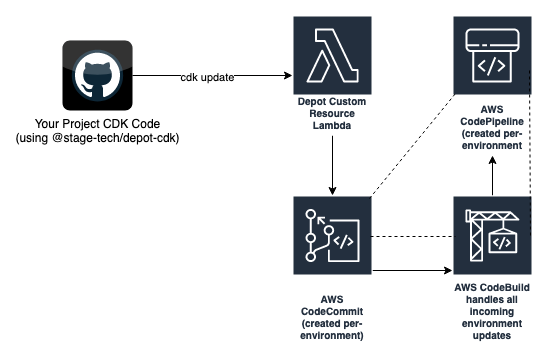
The dotted lines indicate the pipeline process that is setup for every deployed Depot environments. Code is stored in source control, and when a CDK operation (e.g. cdk deploy) is run, the Custom Resource lambda function updates your Depot environment configuration repository (CodeCommit), which triggers your environment's CodePipeline. The CodePipeline then executes CodeBuild which deploys the cloud infrastructure updates required based on your deployment operation (create, update, delete).