Snowflake location
Overview
Snowflake storage supports:
- Transactions
- SQL views
- Arbitrary queries and automatic query expansion using joins
The following configuration properties are supported:
warehouse- Name of the Snowflake Warehouse to usecredentialsSecretArn- The ARN of a secret containing the Snowflake connection username, password, and private key. Must be stored as JSON secret with 'username', 'password', and 'privatekey' fields.accountId- Snowflake Account IDregion- Snowflake RegionroleArn- Snowflake Role ARNcreateEntities- Whentrue, Snowflake tables and views will be created automatically if they do not exist.writable- Whenfalse, Snowflake will only allow writes through transaction api.dataLocations- S3 locations for which to create Stages (specify without s3:// prefix)
When creating a AWS Secrets Manager JSON secret, you must set it up with three fields: username ,password and privatekey. These should contain your Snowflake credentials which Depot will use to connect to Snowflake. The Secret must be accessible to the Depot environment AWS account.
Snowflake entity creation
When you use a Depot Snowflake Location with a Dataset, under the hood, Depot will use a Custom CloudFormation Resource to talk to Snowflake and create various entities to support your Depot Dataset.
- Database (a Snowflake database is created per-Dataset)
- Snowflake database integration for s3 (per dataset)
- Stages
- always creates a stage for default data bucket
- for each DataLocations in snowflake location config
- Schemas (schemas matching your Depot Package(s) are created)
- Additional schemas created with suffix _HISTORY for any table that has history enabled(default)
- Tables (tables that align with your Depot Package(s) are created)
- Additional tables created under schema with suffix _HISTORY for any table that has history enabled(default)
- Views (views that align with your Depot Package(s) are created)
- Materialized views
- that are formed from 1 target table are not created as part of a deployment
- that are formed from 2 or more tables are created but not populated as part of the deployment. To populate such materialized view you need to run a refresh transaction
- UDFs
- JavaScript and SQL UDFs are created
- UDTFs
- SQL UDTFs are created
- Stored Procedures
- A JSON File Format (per Database). The File Format is given the same name as the environment and sits in the PUBLIC schema.
For details on the naming conventions for the above entities, see the Snowflake Naming Convention documentation.
The current Depot Snowflake Resource Provider will only create the entities describe above in the first instance that they do not already exist. (“CREATE IF NOT EXIST” style queries are run by the provider).
You may also notice when adding new schemas to an existing Package, or adding a new Package with removal of an old Package, that older entities persist in Snowflake. This happens because there is no current support for Update (on schemas) or Delete of other Snowflake entities.
Permissions
Don’t forget to grant permissions for your Snowflake database and warehouse to the role that your user belongs to. Permissions must be granted explicitly, even if you are able to query the data without them through the Snowflake UI. MFA should be disabled on the account used for access.
If you create a secondary (replica) Depot storage location using Snowflake, you will need to update your Snowflake dedicated IAM role (that Snowflake assumes) to allow read/write access to your Depot environment’s data bucket. If you are using the createEntities flag for your Snowflake Location and/or Datasets, then you can identify this IAM role by named convention:
sdp-{environment-id}-snowflake-db-integration-{dataset-id}
Replication
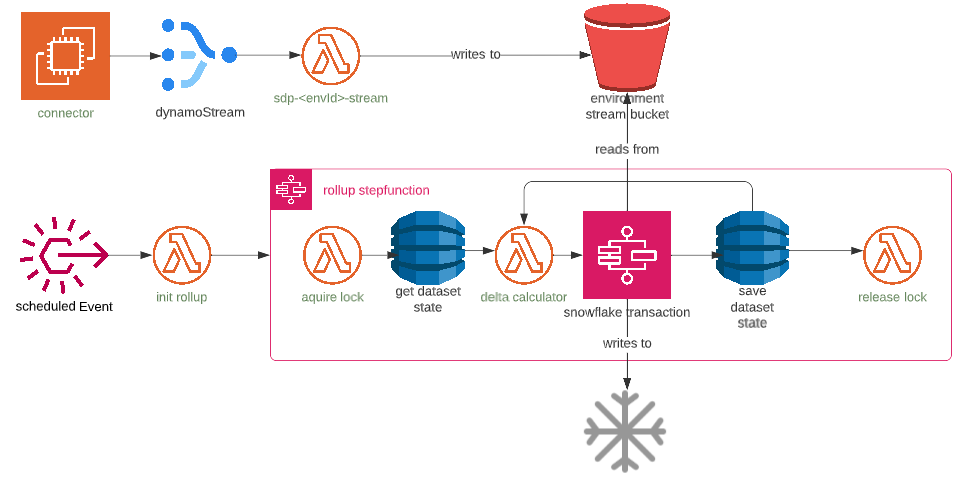
dynamodb -> snowflake replication is batched (small window) using DynamoDB streams and Snowflake Transactions
Step by step explanation:
- data is written to dynamo through connector request
- dynamoDb stream invokes
sdp-<envId>-streamlambda which:- writes history data to s3
- event bridge rule scheduled based
replicationWindow(default 60 min) starts rollup step function - rollup step function creates lock on dataset batch operations
- checks previous rollup state and fails if previous run failed
- calculates next delta
- runs transaction
- saves rollup state in dynamoDb
- repeats until next delta matches
upTo(or current hour by default)
Components involved in replication:
- DynamoDB stream handler lambda named
sdp-<envId>-stream - rollup delta lambda named
sdp-<envId>-rollup-delta - EventBridge rule named
sdp-<envId>-<datasetId>-snowflake-rollup-schedulefor scheduling the rollup step function - Snowflake rollup step function named
sdp-<envId>-<datasetId>-snowflake-rollup - dataset state DynamoDB table
sdp-<envId>-State - Transaction step function named
sdp-<envId>-snowflake-transaction