Asynchronous migration choreography
Asynchronous migrations
New as of Depot 9.4.0
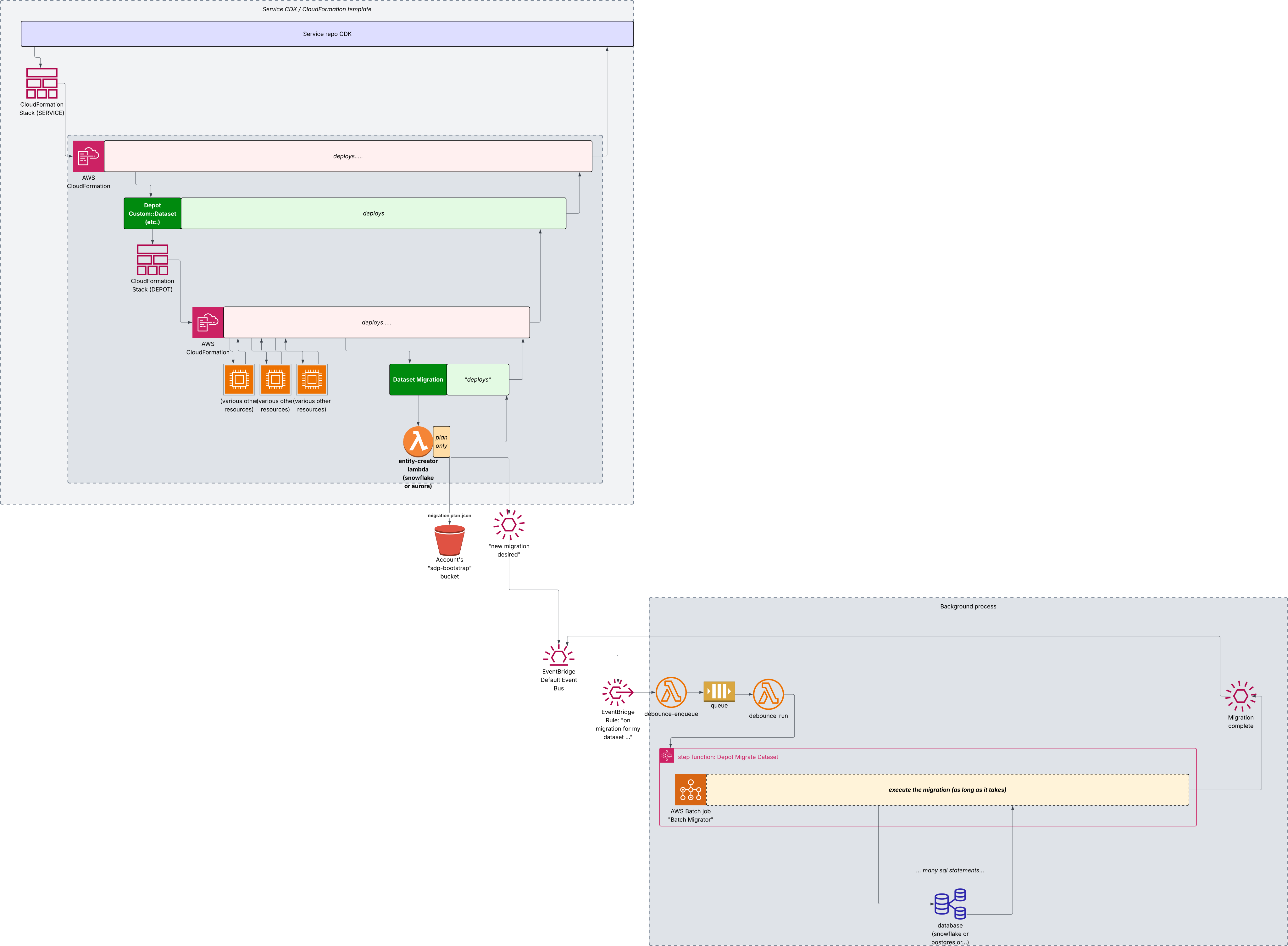 In this mode, Depot splits the migration process into two steps:
- the planning phase is done synchronously during the deployment process. This is something that completes in a few seconds, and is highly unlikely to time out. The Migration Plan document is stored within Depot's bootstrap bucket on S3 as a JSON document.
- the execution phase is done asynchronously, and outside of the CloudFormation deployment process. Whether it succeeds or fails and when, does not influence the outcome of the CloudFormation deployment.
At the end of the planning phase, the migration lambda function sends a message on EventBridge (on the default bus unless
a specific bus has been configured using the migrationOptions.migrationMode.eventBusArn property).
Unless the migrationOptions.migrationMode.customEventBinding has been set to true, Depot also installs a rule that
listens to that message, passes it through a debounce stage using an SQS FIFO queue configured to deduplicate messages
within a one-minute window, and then invokes the migration executor step function.
The migration executor step function uses AWS Batch to execute the same code as in the synchronous migration lambda, but free to exceed the 15 minute timeout.
Optionally, if the migrationOptions.triggerSeeding property is set to true, the migration executor step function will also execute
the dataset's seeding step function.
Asynchronous migrations: caveats
- The deployment is likely to complete significantly ahead of the completion of the migration. For that reason, there may exist a window of time where the deployed service (or frontend!) may already expect the new versions of the dataset's schemas, while the actual migration isn't yet complete.
We recommend to schedule work packages, to the extent possible, so that additional fields are deployed in a first release train, in a way that is backwards and forwards compatible with the previous and the next version of the services or frontend; and to begin using and depending on the new fields and tables in a subsequent release train.
When that is not possible, it is necessary to arrange an agreed outage window.
- Error detection and recovery isn't yet much automated. Deployment error messages happening during both sychronous and asynchronous
migrations are sent to CloudWatch logs that are displayed in the CloudWatch dashboard. It is possible to
re-run manually a deferred migration by rerunning the step function
sdp-${environmentId}-ds-migration-runnerwith the same payload as during the failed migration (see below)
As of Depot 9.4.0, there is no automatic suspension of the dataset during the migration process or between the time a migration intent is registered and its completion.
It is possible to identify that the dataset is being migrated by looking at the Dataset view in the __admin dataset,
and checking the values of the desiredVersion, attemptedVersion and deployedVersion columns.
desiredVersionis updated synchronously during the deployment processattemptedVersionis updated when the migration execution beginsdeployedVersionis updated when the migration execution completes successfully
Having the three fields set to the same version indicates no further migrations are planned (normal state).
automatic suspension of the dataset as part of migrations is a post 9.4.0 discussion topic.
Re-running a failed migration, or manually executing a migration plan
It is possible to re-run a failed migration, or to manually execute a migration plan.
To do this, run the step function sdp-${environmentId}-ds-migration-runner with the following payload:
| key | example value | description |
|---|---|---|
eventId | 4ec69297-6006-1d40-0b49-0c1110e74f22 | The UUID of the EventBridge event that triggered this migration (if available) or any other identifier |
datasetId | dev-9afc0c483ed3 | The ID of the environment in which the migration should happen |
migrationPlanBucket | sdp-bootstrap-551762560152-eu-west-3 | The name of the S3 bucket where the migration plan is stored (usually the bootstrap bucket) |
migrationPlanPrefix | `` (empty string) | A pre-prefix to the migration plan file name, usually empty, but may be set to a value that needs to be prepended to the migrationPlanKey |
migrationPlanKey | sdp-dev-9afc0c483ed3/migrations/1234-blah/2025-05-28/....$(uuid).json | The key of the migration plan file in the S3 bucket, usually sdp-<environmentId>/migrations/<datasetId>/<datasetId>.json |
chainWithSeeding | true or false (default: false) | Whether to run the seeding step function after the migration step function. If set to true, the seeding step function will be executed after the migration plan is completed. |
firstPhase | 100 | Optional: skip any phase numbered before this one. If set, the migration plan will only execute phases starting from this number. |
lastPhase | 2000 | Optional: skip any phase numbered after this one. If set, the migration plan will only execute phases up to this number. |
Note: the firstPhase and lastPhase parameters are never set by Depot itself, but may be set manually in order to
perform partial recovery of a failed migration.
The Migration Plan file is a JSON document that conforms to the schema described in the
MigrationPlan section.
It should be read-accessible by the role executing the migration plan executor batch job.
additional optional parameters may be added in the future
We only support running execution plans generated by Depot itself.
Not-yet-implemented features
-
There is an intent to let the client service register a way to adjust the MigrationPlan in order to augment Depot's migration capabilities (or replace them altogether), but the precise mechanism or mechanisms are not yet fully defined.
-
The effective availability of the dataset until the migration process is complete may appear to be a bit unpredictable.
It is strongly recommended to split the deployment of new columns in one release train, and the use of these new columns in a subsequent release train so that live code remains compatible with the underlying database at all times. If this isn't possible, it may be possible to assess the state of the migration process using theDatasetschema of the__admindataset.