Introduction to development with depot
This guide will go through how to create Depot environment from the beginning.
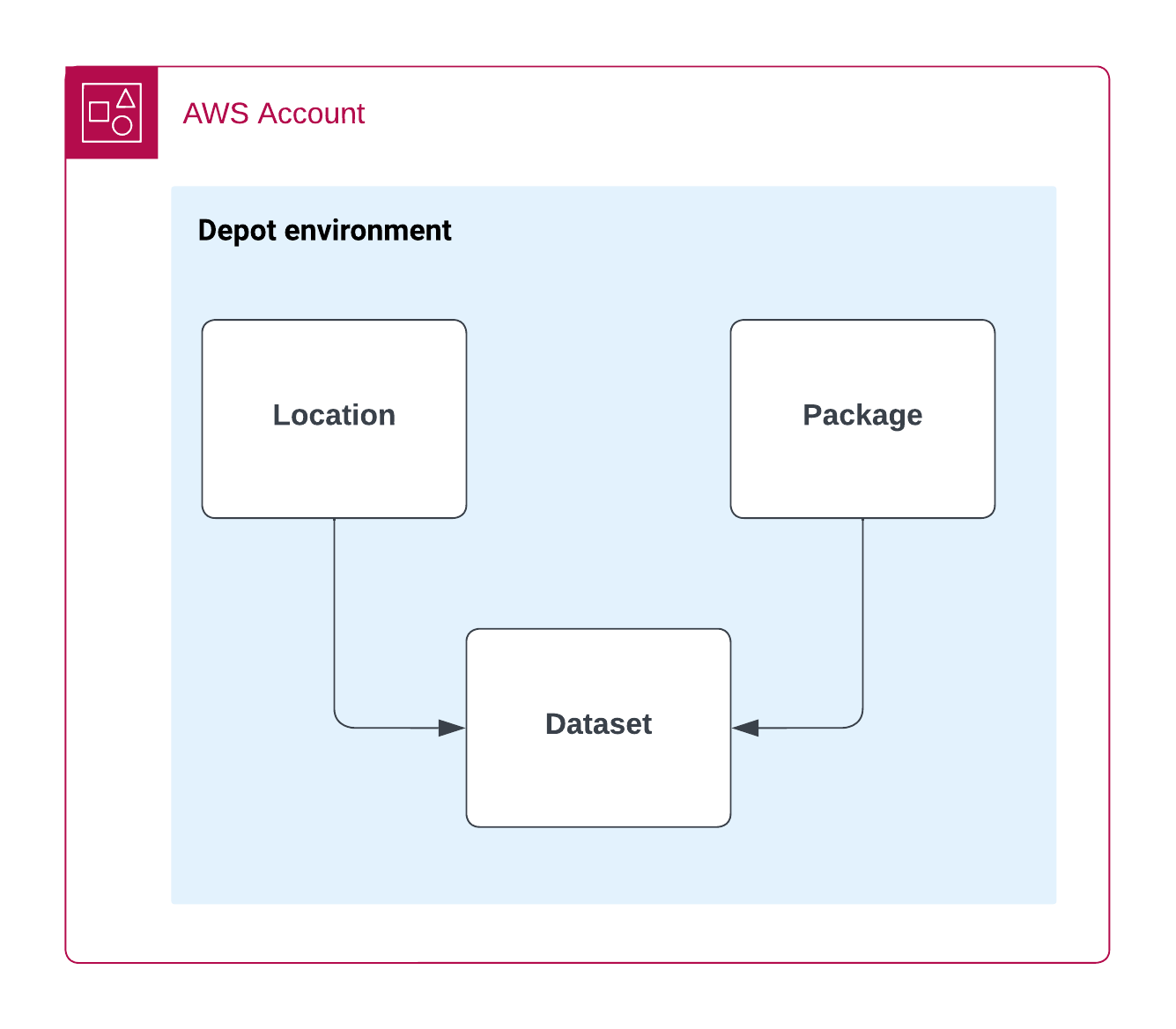
The simplest Depot environment would contain three Depot constructs:
- Schema package - Collection of database entity definitions.Read more
- Location - Database configuration.Read more
- Dataset - Construct that allows to combine location and schema package and provides api address. Read more
Creating your first schema package
Depot uses Basestar schema definition language to describe schemas, and NPM to publish them.
Let's go through the steps how to create your first schema package.
To start you will need to have empty typescript repository.
Creating schema
In src folder create a folder simple and in that folder create a yaml file named Example.yml

Inside Example.yml lets write our first schema.
simple.Example:
  type: object
  version: 1
  properties:
    userName:
      type: string!
    age:
      type: integer
Let's go through above schema line by line
simple.Example:defines entity name, must match file path.type: objectdefines entity type. More entity types are described under schema typesversion: 1defines schema version. Version is used in migrationspropertiesstart of properties blockuserName:name of the field (the first leve of properties will always be taken as field name ).type: string!type of the field.!makes property required.age:name of the field (the first level of properties will always be taken as field name )type: integertype of the field
Publishing package
To use package in other places you need to publish it, you can do it by:
- publishing it to stage npm during build
- or if you use mono repo, you can import it using local ref.
To publish a package first you need to group your schemas. Create index.ts with fallowing code
import {Packages} from "@stage-tech/depot-package-common";
import {resolve} from "path";

import {name, version} from "./package.json";

const rootDir = __dirname.endsWith("/dist") ? resolve(__dirname, "..") : __dirname;
export const pkg = Packages.depotPackage({
    name: "my-package",
    schemaDir: [resolve(rootDir, "./src")]
});
This code is taking all the schemas from src folder and constructs depot package.
Deploying Depot
Depot infrastructure is configured using high level cdk constructs.
Let's go through the steps how to create your Depot cdk project.
To start you will need to have empty typescript repository with fallowing dependencies:
@stage-tech/depot-cdkcdkcdk-constants
Let's look how simple depot environment would look like:
import * as depot from "@stage-tech/depot-cdk";
import { DepotAuroraInstanceType } from "@stage-tech/depot-cdk/dist/stage-depot-location";
import * as examplePkg from "@stage-tech/example-pkg";
import { App, aws_ssm as ssm, Stack, StackProps } from "aws-cdk-lib";

export class DataService extends Stack {
    constructor(scope: App, id: string, props: DataStackProps) {
        super(scope, id, props);

        const depotEnvironment = new Environment(this, `MyEnvironment`, {
            account: { name: "example", id: Aws.ACCOUNT_ID },
            name: "test"
        });

        const aurora = depot.Location.Aurora.withCluster(this, id, {
            environment: depotEnvironment,
            name: "demo-aurora",
            writer: {
                engine: DepotAuroraInstanceType.SERVERLESS
            },
            readers: [],
            serverlessCapacity: {
                min: 0.5,
                max: 2
            }
        });

        const pkg = new depot.Package(scope, "DemoPackage", examplePkg.pkg);
        new depot.Dataset(scope, "DemoDataset", {
            environment: depotEnvironment,
            package: pkg,
            name: "demo-dataset",
            location: aurora
        });
    }
}
And go through each component separately
Depot environment
Depot environment construct is where all the depot infrastructure is located, but from developer perspective it's just a vesel to contain other constructs.Read more
const depotEnvironment = new Environment(this, `MyEnvironment`, {
            account: { name: "example", id: Aws.ACCOUNT_ID },
            name: "test"
        });
Location
A Location defines where data is stored, in this case we create a new AWS Aurora serverless cluster. Read more
const aurora = depot.Location.Aurora.withCluster(this, id, {
    environment: depotEnvironment,
    name: "demo-aurora",
    writer: {
        engine: DepotAuroraInstanceType.SERVERLESS
    },
    readers: [],
    serverlessCapacity: {
        min: 0.5,
        max: 2
    }
});
Package
To use depot package import the package that we published in previous section i.e. import * as examplePkg from "@stage-tech/example-pkg"; and when create Depot cdk package construct const pkg = new depot.Package(scope, "DemoPackage", demoPkg.pkg);.
Dataset
Let's combine location and package that we just created using Depot CDK construct.
new depot.Dataset(scope, "DemoDataset", {
    environment: depotEnvironment,
    package: pkg,
    name: "demo-dataset",
    location: aurora
});
Dataset is responsible for deploying your package schema to the location. It will also expose APIs(by default Depot provides lambda APIRead more)
Deploying
Depot is deployed using CDK cli. To setup it you will need to add cdk.json file to the root of Depot cdk repository, with fallowing
{
  "app": "npx ts-node bootstrap/demo.ts"
}
and create file bin/demo.ts with fallowing code inside
import { App, StackProps } from "aws-cdk-lib";
import { DataService } from "../lib/depot-data/data-stack";

const dataStack = new DataService(app, `demo-data-stack`, {
    aws: { name: "demo", region: "eu-west-1" }
});
and finally run cdk deploy from root of your repository. This will initiate depot deployment.